Error Message Explained: User Profile Service Failed the Logon
- User Profiles
- Published Sep 18, 2013 Updated Mar 13, 2021
This article is part of Helge’s Profile Toolkit, a set of posts explaining the knowledge and tools required to tame Windows user profiles.
Many errors related to user profiles result in the user getting a temporary profile instead of the regular local or roaming profile. I have written about possible causes for that here. In addition to that, there is an entirely different category of errors that occur when even a temporary profile cannot be created. This article describes likely causes.
User Profile Service Failed the Logon
When Windows cannot even create a temporary profile you get to see the following error message:
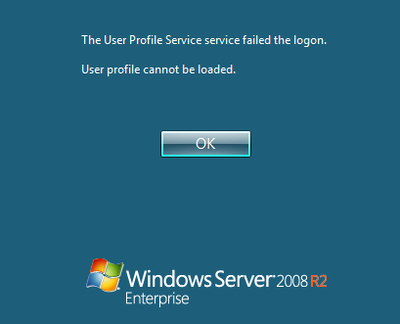
The User Profile Service failed the logon. User profile cannot be loaded.
This typically happens when the default profile, stored in C:\Users\Default, has incorrect permissions or is corrupt in some way.
Default Profile Permissions
If all is well, the directory C:\Users\Default inherits permissions from its parent folder, C:\Users. This results in SYSTEM and Admninistrators having full control, while Users and Everyone have read permissions. In SetACL Studio this looks as follows:
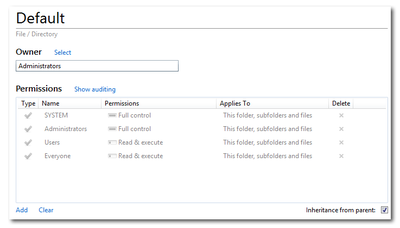
The permissions for SYSTEM and Administrators are not relevant, but if for some reason the user logging on does not have read permissions on C:\Users\Default the error message User Profile Service Failed the Logon will be displayed and logging on is not possible.
When this happens the user profile service logs an event with ID 1509 and source User Profile General in the application event log:
Windows cannot copy file \\?\C:\Users\Default\ to location \\?\C:\Users\username\. This error may be caused by network problems or insufficient security rights.

DETAIL - Access is denied.
Default Profile Corrupt
Logon is not possible, either, if the default profile’s NTUSER.DAT file is nonexistent or corrupt.
If NTUSER.DAT does not exist the user profile service logs an event with ID 1500 and source User Profile Service in the application event log:
Windows cannot log you on because your profile cannot be loaded. Check that you are connected to the network and that your network is functioning correctly.

DETAIL - The system cannot find the file specified.
If, on the other hand, NTUSER.DAT is corrupt the user profile service logs an event with ID 1508 and source User Profile Service in the application event log:
Windows was unable to load the registry. This problem is often caused by insufficient memory or insufficient security rights.

DETAIL - The system has attempted to load or restore a file into the registry, but the specified file is not in a registry file format.
for C:\Users\username\ntuser.dat
Fixing a Corrupt Default Profile
The easiest way to fix a corrupt default profile is to delete the content of C:\Users\Default and copy it from a working system. Make sure, though, that the machine you copy from has the same operating system version and language.




Comments